Upcoming - All Time

From the community
Video

URL Optimization - Re-Tooling of URLs - SEO.cc

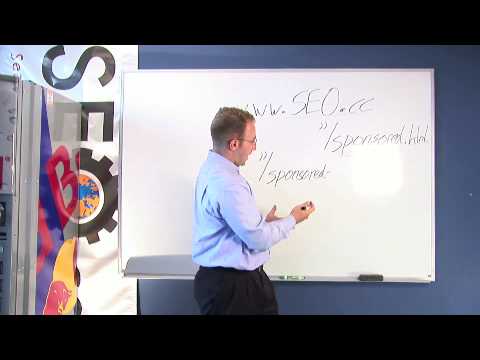
URL Optimization - This is a part of Organic Search engine Optimization. I am going to show you how to assign a name to the file of an individual page within your website. Now I am going to use our website www.seo.cc as our example and what I am actually going to talking about is a page specific to Sponsored Search Marketing. For example if my URL is www.seo.cc and the name of my page is currently sponsored.html and this page is actually speaking about Sponsored Search Marketing. I am going to want to assign a more descriptive name to the page itself. So, once again I am going to take the www.seo.cc, and place it right here and then we are going to place a forward slash, sponsored-search-marketing and once again we are going to hyphen this out so that the search engine reads it as spaces and can actually read what this page is about before actually going to the page. So what your page now is going to be, instead of sponserd.html you're going to direct it to sponsored-search-marketing.html which is more descriptive to the engines and the users themselves and you're also going to want to place what's called a 304 permanent redirect from sponsored.html and instruct the engines to bring the users to your new URL extension, sponsored-search-marketing, where you'll assign keywords specific to the Sponsored Search Marketing category itself. Making this website totally relevant now to Sponsored Search Marketing and you'll also see that the search engines will actually bold the page once it shows up in the top.

URL Optimization - Re-Tooling of URLs - SEO.ccVideo
From the community
Video

Meta-tag Authoring - Organic Search Engine Optimization

Now for organic search engine optimization, we are going to cover Meta Tag Authoring. For Meta Tag Authoring, you’re going to have 3 major sections – your title, your keyword, and your description. Now, you are going to want to spend time writing each and you will want to keep them very concise and focused on the theme of the actual page itself. Now when we’re looking at the title, I am going to back to the Search Engine Optimization example so, for title, I am going to use the keyword “Search Engine Optimization.” Everybody has their own style of SEO, but I prefer to use 3 to 5 keywords per page assignment. So, when I’m going to assign words that have to do search engine optimization, I am going to use the keyword SEO, all lower case, and I am actually going to use SEO with spaces in between in it just in case somebody types a period (.) or spaces, and I am going to assign the keyword search engine optimization. Now I’m writing my keywords, I’m keeping everything lower case because a lot of people most commonly type in words on the search engine in lower case and the search engine actually reflects how somebody is searching to the words it’s actually going to match-up with, in a keyword base. So, you wanna make sure keep your characters in all lower case. You want there to be a logical pattern between your title, your keywords, and your description. So, you are going to actually assign a description which is going to be the description that the search engine is going to list below your website, most likely, unless it actually pulls content from your page, right below the listing of the website itself. So you’ll want to write something that has keywords in it and say, “Search Engine Optimization, commonly known as SEO, allows you to list on the search engines”. Now what we did here with the description is we hit upon a few specific keywords, so that we’re not placing too many keywords in the Meta tags, but you can see the actual logical pattern going from your title into your keywords and then from keywords into description. As you can see, the word SEO appearing in your keyword assignment reflects down to SEO in your description. Then you have the keyword, Search Engine Optimization here in your description, linking to the keyword with-in your Meta tag. You can see there is an actual logical pattern going from your title, your keywords, and then into your description. If you want to actually assign numbers to it or letters to help you organize it, you can say (1) is SEO (2) search engine optimization. Play with it however you like. Like I said, everybody has their own SEO techniques.

Meta-tag Authoring - Organic Search Engine OptimizationVideo
From the community
Video

Onsite Content Changes - Organic Search Engine Optimization

"Now for organic search engine optimization, we are going to discuss “Onsite Content Changes.” Now, when we are looking at a webpage in particular we are going to back to www.seo.cc and we are going to use, as an example, the search engine optimization page. Search – I’m going to write out my keywords that I want the search engine to detect and hyphen them out - optimization.html. Now, on the page itself for the content assignment, you’re going to want to have a few areas where we make sure that within the content we’re seeing the words “search engine optimization.” In your Meta Tags, you’re going to want to make sure that your title is going to read “search engine optimization,” or at least have the keyword embedded. The title is what’s going to be at the top of the web browser when the page pulls up. It’s going to be along the top of the toolbar, there. It’s not actually going to be on the page itself. So, to keep it simple, I’m just going to put the acronym “SEO”, which stands for search engine optimization. I’m going to close my title tag, and the sign that this page is about search engine optimization, or SEO. Now, when we go into the actual content of the page itself, we’re going to want to make sure that we have an “H-Type” heading, it can be H1, it can be an H2, you can look up and assign whichever graphically fits into your page itself, but you want there to be header language so when the search engine reads your website, it reads from the meta tags down into the header information of the page itself. Now when you’re looking at the actual onsite content, for example, now we have our header tag which once again will reflect SEO, there are different components of SEO that people might actually be searching for and they can actually use to find your site. So, if somebody wanted to, for example, read about an SEO ranking report, you’d actually want to place content that says “SEO Ranking Report” and make this content, “SEO Ranking Report,” a hyperlink or hotlink and assign it to a page that covers the topic of SEO Ranking Report. Now, what happens is, when the search engine actually clicks on this keyword, “SEO Ranking Report” it understands the page that it’s being lead into is actually going to talk about an SEO Ranking Report. Now the computer has actually built in the relevancy from here to there. Now back into how your content should be reflected for the word “Search Engine Optimization”, you’ll want to keep what is called the “keyword density” quite light, as to how often your speaking about SEO, or search engine optimization. For example if you have 500 words on the site itself, you’ll want to keep it at approximately 2 ½% to 5 %, it depends on how many keywords you would like to actually place on the page. But, you don’t want the reader to actually identify that you are placing the words for these purposes. So you’ll take the 500, if this is the total number of words on the page, and you’ll assign, for example 5 %, which would actually be 25 words, which could allow you to mention search engine optimization or SEO, anywhere from, let’s say 5 to 10 times. Then you’ll have a page focused on the keyword of SEO, search engine optimization, built relevantly, leading into another relevant topic to search engine optimization and SEO, which is your SEO ranking report, which leads into another page. The deeper that you build your pages beyond the initial page of search engine optimization, the better your chances of achieving higher organic rankings.

Onsite Content Changes - Organic Search Engine OptimizationVideo
Ben helps you get started

Found something worth sharing? Post a link, choose a clear title and join the conversation.

Share a video or link →Your account →Forgot your password?

Share a discovery

Found a video, picture or story? Add its link.

You can review the title and description in the next step.
BENDECHO SELECT

Finds in focus

From the last 21 days. Metrics show these finds’ lifetime totals.

Keep exploring

DISCOVERY · HIGHLIGHTS

In focus right now.

Published since 01.11.2026 · Metrics show these posts’ lifetime totals.

COMMUNITY SIGNALS

The community discovers

New finds and reactions. Each post appears only once.

Keep exploring